Insights
Top Portfolio Trackers of 2026

Top Portfolio Trackers of 2026

Benefits

What a portfolio tracker should do for you

There are dozens of “trackers” out there. We focused on tools that:

We also included Enrich, which we built as a portfolio intelligence app for US DIY investors who want help keeping a multi‑account plan on track without handing over control or paying a percentage of assets.​ This guide is general education; it is not a recommendation to use any specific tool or strategy. Your situation may be different and may call for different choices.

Connect to multiple outside institutions (via aggregators like Plaid or direct links), so you don’t have to move money or log in to each account every week just to see everything in one place.

Have a meaningful US user base and are actively maintained.

Offer a real portfolio view, not just a budgeting or cash flow app with a “holdings” tab tacked on.

Are accessible for self‑directed investors who still want to be in control.

Benefits

How are your ranking?

Before we rank tools, it helps to decide what “good” means for you. At a minimum, we think a modern tracker should:
Connect Accounts
Pull in all your investable accounts: taxable brokerage, workplace plans, IRAs, maybe HSA, and cash, not just one broker.
Asset Allocation
Show your actual asset mix across accounts (stocks, bonds, cash, funds, sectors, and sometimes factors such as market cap, growth vs. value, and/or regions).
Performance Tracking
Track performance sensibly, including dividends and contributions over time.
Benchmarking and Drift
Make it easy to see if your current mix still matches the plan you thought you were following.
MultiAccount Investing

Essential Tasks for Multi-Account Investors

However, an asset allocation-based approach requires “boring but important” jobs that a serious multi‑account investor should do year after year, like:

Customizable asset allocation
Keeping your overall mix in line with a target across multiple accounts and brokerages.
Asset allocation alerts
Spotting useful rebalance windows instead of rebalancing on a random calendar date.
Tax-loss harvest alerts
Flagging plausible tax‑loss harvesting candidates when markets move, while leaving room for judgment.
Avoid cash drag
Catching idle cash that’s quietly building up and not doing any work.
Aptimize portfolio for tax-advantages
Watching for asset location issues across taxable and tax‑advantaged accounts, depending on your plan.
Clear trade instructions
Assessing your asset mix for opportunities to optimize for your goals and taxes
Tools

Five ways to see your whole portfolio in one place

Free
Web
iOS
Android
Empower Personal Dashboard
Best if you want a free bird's-eye view, not fine-grained steering.
Wide bank & brokerage coverage, clean net-worth and fee charts
Retirement "what-if" planning built in
No help with tax lots or asset-location, leans toward advisory upsell
Empower’s dashboard (formerly Personal Capital) is the one most people hit first. It connects to a wide range of banks, brokerages, and retirement plans, giving you a combined view of net worth, investments, and cash flow.
Where it shines:
  • Strong account coverage and mostly painless aggregation for US users.
  • Clear charts of your total portfolio, including basic allocation breakdowns and fees.
  • Planning tools for retirement timelines and “what if” scenarios, which can be handy for first‑pass checks.
Where it comes up short:
  • The focus is on overall wealth planning and net worth; the portfolio tools are not built to run a tight, rules‑based allocation across multiple brokers and accounts.
  • You get less help on specific portfolio tasks like “which lots could be sold for tax‑loss harvesting?” or “which accounts are holding the tax‑inefficient pieces of my portfolio?”
  • The business model leans on offering managed advisory services, which may or may not be what you’re looking for.
Cost: The dashboard and portfolio tools are free for consumers; Empower earns revenue from separately offered advisory services.
Best if: You want a free, bird’s‑eye view and basic allocation/fee views, and you’re okay with a general wealth‑management focus.
Read more
$249+/yr
Web
Kubera
Best if you want a private command center and can make your own calls.
Brokerages, crypto, real estate, private holdings, all in one net-worth view
Privacy-conscious, no ad-driven business model
Minimal guidance — it's a tracker, not an advisor
Kubera positions itself as a modern net-worth and portfolio tracker for people with more complex setups: multiple brokerages, different currencies, and maybe some alternatives.
Where it shines:
  • Flexible asset types: brokerages, crypto, real estate, private investments, and manual entries can all live in one place.
  • Clean interface focused on net worth and portfolio composition over time.
  • Paid, privacy‑conscious model that appeals to people who don’t love the idea of their financial data feeding an ad machine.
Where it comes up short:
  • Guidance is minimal by design; it’s a tracker, not an advice engine.
  • Limited built‑in help for things like tax‑loss harvesting or asset location; you’ll likely export or eyeball, then decide what to do.
  • Goals are more “you define it” than “handholding,” which some people love, and others find too open‑ended.
Cost: Subscription‑based (at least $249/year) with a trial period; exact pricing is listed on their site and can change over time.
Best if: You mostly want a clean, private command center for everything you own, and you need flexibility across many asset types. You’re comfortable making your own allocation and tax decisions on top of that.
Read more
Free
Web
SigFig Portfolio Tracker
Best if you want free fee-and-diversification checks, upsells aside.
Free multi-brokerage linking with a basic portfolio-health view
Flags high-fee funds and weak diversification automatically
Best coverage limited to major US brokers, light on tax planning
SigFig offers a free portfolio tracker that can pull in accounts from various brokerages, analyze fees, diversification, and basic risk, and then optionally connect you to a managed account service if you want more help.
Where it shines:
  • A free way to link multiple brokerage accounts and see your investments in one dashboard, including a basic “portfolio health” view.
  • Automatically flags common issues like high‑fee funds or lack of diversification and suggests lower‑cost or more diversified alternatives.
  • Good on‑ramp for people who want to experiment with analysis before deciding whether to use a robo or keep things fully DIY.​
Where it comes up short:
  • Aggregation and tracking are strongest for a limited set of big US brokerages; coverage beyond those can be patchy.
  • The free tracker focuses on diversification and fees, but offers limited support for detailed goal tracking or cross‑account tax planning. You won’t get deep asset‑location or tax‑loss workflows.
  • The overall experience is shaped by the robo‑advisor business model, so some users may feel nudged toward managed accounts when they only want tracking.
Cost: The portfolio tracker is free to use; managed investing services have their own fee schedule (typically a percentage of assets) if you choose that route.​
Best if: You want a no‑cost way to see accounts in one place, get some analysis on fees and allocation, and you don’t mind that the business model includes an advisory upsell.
Read more
$299+/yr
iOS only
Mezzi
Best if you want institutional-style diagnostics, right on your phone.
Pulls accounts together with live allocation and exposure tracking
AI-flagged concentration risk, fee drag, and tax-saving opportunities
Newer, still evolving, and can feel like a lot of information
Mezzi is a newer portfolio tracking app that focuses on surfacing hidden risks, concentration, fees, and potential tax‑related opportunities across accounts, using more advanced analytics under the hood.
Where it shines:
  • Strong multi‑account dashboard that pulls together brokerage and other accounts via Plaid/Finicity, with live updates on allocation, performance, and exposures.
  • Analysis focuses on “hidden” issues: concentrated positions, fee drag, and potential tax‑saving or asset‑location opportunities across accounts using AI‑powered insights.
  • Real‑time prompts and alerts around rebalancing, tax‑impact of trades, and portfolio changes, aimed at independent investors who want more institutional‑style diagnostics without hiring a full‑service advisor.
Where it comes up short:
  • It’s a newer, paid platform, so you’re paying subscription fees and living with more product evolution than with long‑established trackers.
  • The focus on sophisticated analytics and AI‑driven insights can feel like overkill if you just want a simple net worth or basic allocation view. Some users may find the volume of information overwhelming.
  • As of now, it’s iOS‑only for consumers, which limits access if you prefer Android or a pure web workflow.​
Cost: Consumer pricing is subscription‑based (at least $299/year), usually billed monthly or annually, with trial or intro offers; exact numbers are available on their site and in the App Store listing.
Best if: You’re comfortable with a more analysis‑forward app that points out concentration, fee drag, and tax‑related issues, and you want that in your pocket on an iPhone.
Read more
$50/yr
iOS only
Enrich
Best if you already have an allocation and want it kept on track.
Maps holdings to goals across accounts, with look-through allocation analysis
Alerts for rebalancing, idle cash, and tax-loss candidates, plus a trade checklist
No custody or trade execution, you still act at your broker
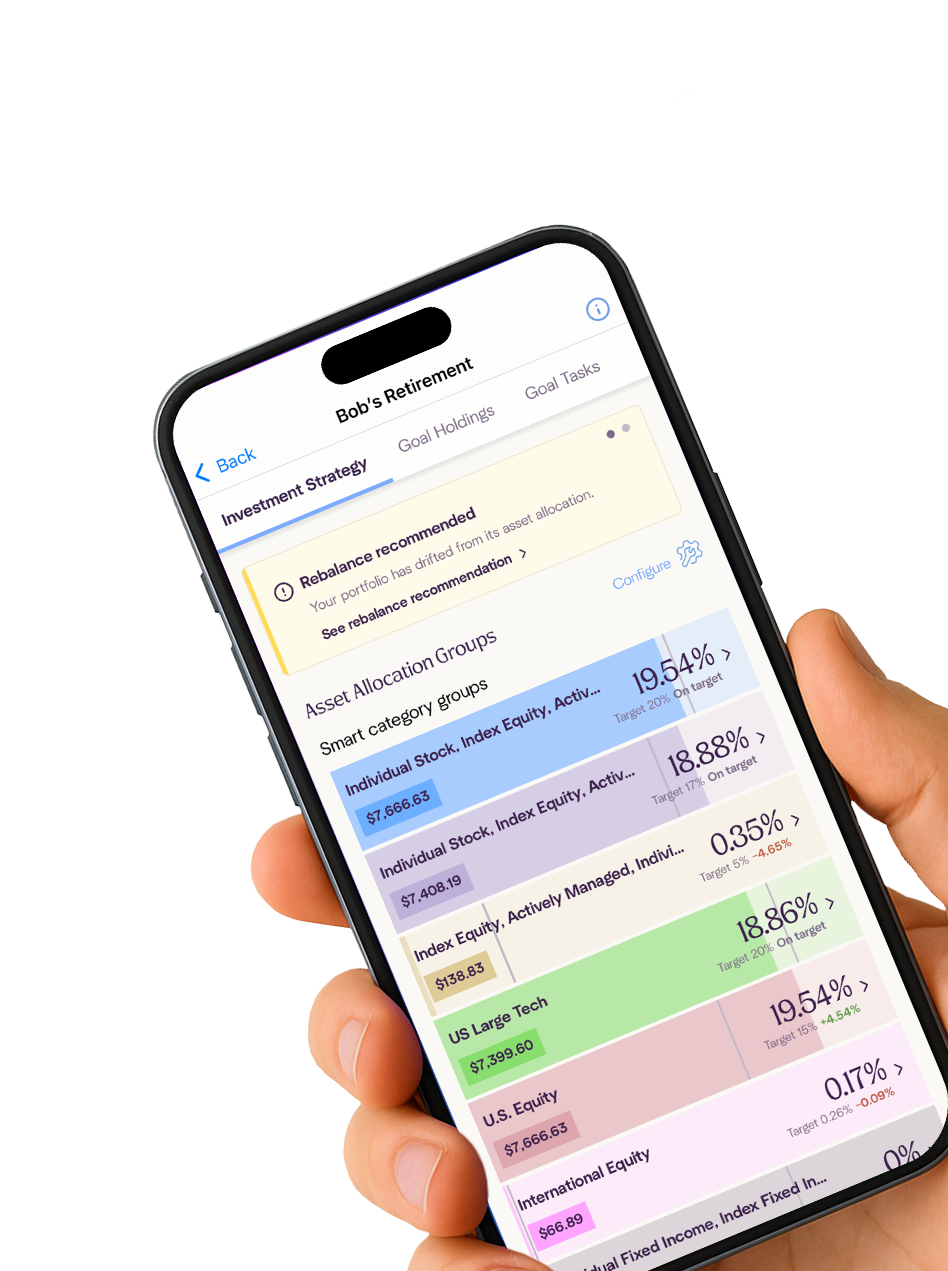
Enrich connects read‑only to your existing US brokerage and retirement accounts, maps holdings to specific goals, and checks whether your cross‑account mix and key tax‑related jobs still line up with the plan you set.
Where it shines:
  • Designed specifically for US DIY investors with multiple brokerage accounts, retirement accounts, and 529 accounts who want to see their true asset allocation across accounts against a goal‑specific plan, not just a single pie chart per account.​
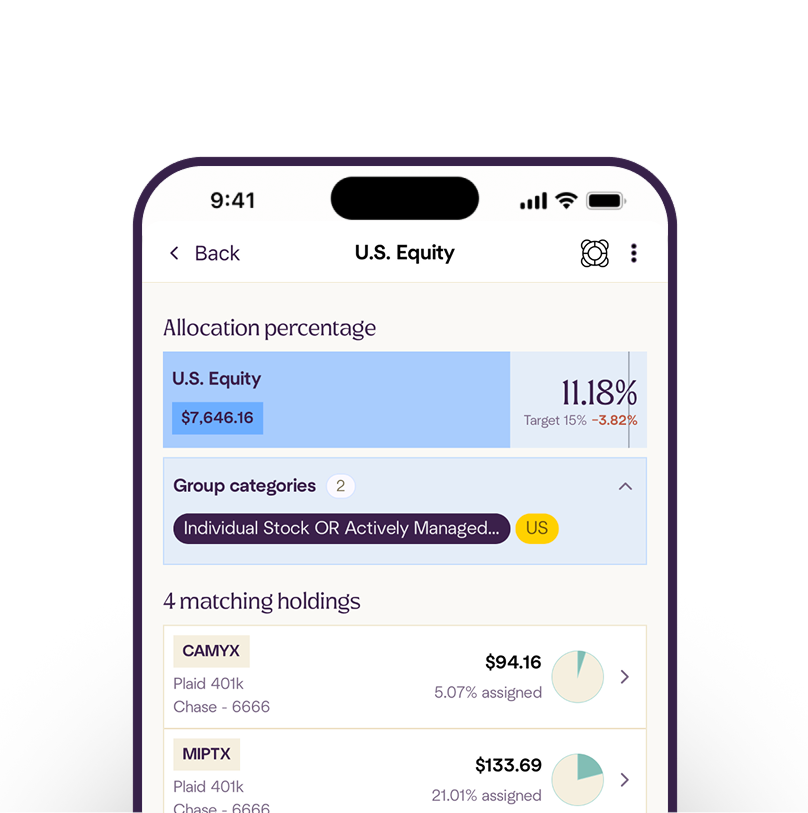
  • Highly customizable asset allocation: build your own allocation using your own defined set of factors, or choose from a library of allocations. Use a look-through analysis of your portfolio to identify over- or under-exposure.
  • Checks and proactively alerts you to rebalance opportunities, idle cash, potential tax‑loss harvesting candidates, goal-on-or-off-track status changes, and asset‑location questions across accounts.​
  • Produces trade instruction checklists and rebalance plans you can take to your existing brokers, so you stay in control of trades while reducing portfolio busywork and guesswork.
Where it comes up short:
  • Enrich is not a money‑movement app or robo‑advisor; it does not take custody of assets, manage portfolios, or place trades, so you still need to execute at your broker.​
  • It focuses on portfolio oversight and maintenance rather than budgeting, cash‑flow tracking, or full financial planning, so you may still want a separate tool for day‑to‑day money management.
  • It’s currently iOS‑only for US users and is built for people who already have, or are willing to set, a target allocation and a goal structure; if you want a “do everything for me” solution, this is not that.
Cost: Flat subscription ($50/year); no asset‑based fees, no trade commissions, and no custody of assets.
Best if: You have a thoughtful asset allocation and want a tool to help with periodic rebalancing, tax‑aware practices, and clear goal‑based planning. These can lead to meaningful differences for some investors over time.
Read more

How to pick a portfolio tracker in about 10 minutes

If you’re choosing from scratch, here’s a simple way to decide:
Start with your main job
  • “I just want to see everything in one place.” → Start with Empower or a similar free dashboard.
  • “I want a clean, flexible net worth and portfolio view, and I’m willing to pay for it.” → Look at Kubera.
  • “I care a lot about performance, dividends, and tax reports on my securities.” → Try Mezzi.
  • “I want to dissect what’s inside my funds.” → Use SigFig.
  • “I want to manage my asset allocation across accounts.”→ Use Enrich.
Re‑evaluate once a year
Tools change. Once a year, quickly check whether your tracker still fits your needs and whether you’re actually using the features that matter to you.
  • A true cross‑account allocation view that lines up against the rules you set, not a generic “here’s your pie chart.”​
  • Checks for drift, idle cash, tax‑loss harvesting candidates, and asset location questions across accounts, so you can decide what to act on.​
  • Plain‑English checklists that translate those findings into possible trades or changes you can choose to make with your broker.
Decide if you’re okay with upsells
If you don’t want advisory sales calls, favor tools with a pure subscription model or clear “no advice” positioning.

Dashboards are good at showing you where you are. They’re less good at quietly tapping you on the shoulder when something in the plan has drifted.

Research suggests that thoughtful asset allocation, periodic rebalancing, tax‑aware practices, and clear goal‑based planning can add up to meaningful differences for some investors over time, but results vary, and there are no guarantees.​​234 Enrich helps you keep an eye on those maintenance jobs with less time in spreadsheets, while you stay in control of what actually happens in your accounts.

how to pick

Which one is right for you?

Commission Broker
People in relationships with specific brokers; high-trust situations
This is for someone who has a decades-long relationship with a specific broker they trust. Maybe a family friend, someone their parents used, or a long-term relationship they've built. The trust overcomes the structural conflicts (commission incentives, suitability standard instead of fiduciary duty). If that's not you, we might skip this entirely.
AUM Advisor 1%
People with complex situations who value the relationship; $1M+
This fits someone with $1M+ who has a genuinely complex situation: equity comp, concentrated stock, business interests, rental real estate, multi-account coordination needs. They value having a single point person who coordinates everything and provides behavioral support during market chaos. They're willing to pay $10,000+ annually for that peace of mind and relationship. If your situation isn't very complex, or you're disciplined enough not to panic sell, we think you're overpaying here.
Fee-Only Advisor
Complex situations; major transitions; customization-focused
This is for someone who needs sophisticated planning, not just investment management, but doesn't want to pay 1% AUM forever. You're in a transition (inheritance, business sale, job change, divorce), or you have ongoing complexity (equity comp, real estate, tax optimization needs) but are capable of executing the plan yourself. You pay $5,000-$10,000 for the comprehensive strategy, then can use DIY software to execute ongoing. Expert advice where it matters, cost efficiency where it doesn't.
Wealth Manager
$5M-$25M+; complex wealth structures; alternatives
This is the only scenario where we think 0.8-1.45% AUM fees make sense: you have $5M to $25M+, you're dealing with multigenerational wealth transfer, business succession, estate structures requiring legal coordination, and you want access to institutional alternatives (PE, hedge funds, real estate syndications). You need a team, not a single advisor. Below $5M, you may be overpaying. Above $25M, you're a priority client and fees might come down.
Pure Robo
Simple situations; hands-off preference; $10K-$500K
This is for someone accumulating wealth in a straightforward situation: W-2 income, 401(k), IRA, taxable account. No RSUs, no rental property, no complex tax angles. You want automatic rebalancing and tax-loss harvesting without thinking about it. The 0.25-0.50% fee is tolerable at this asset level. Once you cross $500K or your situation gets more complex (equity comp, multiple goals, accounts across custodians), revisit this.
Hybrid Robo
Light guidance + automation; $50K-$500K
This is for someone who wants mostly automation but appreciates having access to a human CFP once or twice a year. You're comfortable with the robo's portfolio structure but want the option to ask questions. You're in early to mid accumulation ($50K-$500K). You're not expecting deep customization; just a sanity check that you're on track. If you need real customization or have complex accounts to coordinate, this may not cut it.
"Free" Robo
Just starting; comfort with trade-offs; <$100K
This is for someone with <$100K who's willing to accept mediocre optimization (possible drawbacks like high cash drag, limited fund selection, upsell attempts) to avoid paying a stated fee. You're just starting to invest and every dollar of fees feels meaningful. As soon as you cross $100K, the hidden costs (0.3-0.5% cash drag) can start exceeding what you'd pay for a real robo or DIY software. Move up then.
Pure DIY
Enjoy the process; simple situations; significant time available
This is for someone who enjoys learning about investing, has a straightforward portfolio ($100K-$500K, not spread across 10 accounts), and can dedicate 6-12+ hours per quarter to spreadsheet maintenance and manual calculations. You're disciplined enough not to panic sell. You don't need guardrails because you've built your own. If any of that isn't true, you don't enjoy it, your situation is complex, you don't have the time, we think you should pick a different path.
DIY + Software
DIY who want sophistication; $250K-$5M; control-focused
This is for someone who wants full control and transparency but refuses to pay 0.25-1% annually for it. You have $250K to $5M (the range where fee savings get dramatic). You're comfortable making decisions and learning the basics, but you don't want to spend 12 hours per quarter on spreadsheets. You value customization: defining your own allocation rules, optimizing across all accounts, systematically capturing tax-loss harvesting. You're willing to spend a few hours per quarter reviewing alerts and executing trades. The software handles the grunt work; you handle the judgment calls.

Where do these dashboards stop helping

If you notice a theme, it’s this: most mainstream portfolio trackers either focus on the big picture (net worth and basic allocation) or on deep performance analytics and fee optimization.

Very few are built to run a passive, asset allocation-based strategy. Studies have found that thoughtful asset allocation, periodic rebalancing, and tax‑aware practices can add up to meaningful differences in long‑term outcomes for some investors, although results vary and there are no guarantees.​​1

Sidebar: A portfolio’s asset allocation drives ~90% of your portfolio’s behavior over time, not stock picking or market timing (source). According to Brinson, Hood, Beebower’s paper (Determinants of Portfolio Performance, Financial Planning Journal, 1985-1994), implementing an asset allocation strategy can be the deciding factor between achieving your goals on time or not.

Spreadsheet Fail

Why spreadsheets don’t cut it

If you’ve got more than one investing account, more than likely your broker’s dashboard is only telling you part of the story. So you started logging into each of your brokerage accounts and copying and pasting their values into a spreadsheet. But it's cumbersome. You want something that lets you see balances and recent performance. You want to see your true asset mix across accounts, or whether your taxes and goals are quietly drifting off plan. You probably need a portfolio tracker.

This guide walks through portfolio trackers that help serious DIY savers keep multiple accounts in one view, then shows where a dedicated “portfolio intelligence” layer can help with rebalancing alerts, tax‑loss opportunities, and goal tracking.


Benefits

If you’re further along in your journey, you might also want:

Goal views
“Am I on track for this specific goal?” instead of “Is my net worth bigger than last year?”
Tax‑aware views
unrealized gains/losses, realized gains, help spotting loss harvesting candidates, and basic tax reports.
Intelligent Alerts
Get notifications for rebalance windows, idle cash piling up, or asset location issues (for example, tax‑inefficient holdings living in taxable accounts when they may fit better in a tax‑advantaged account, depending on your situation).
Not every tool does all of this. Most do a few things well and largely ignore the rest. That’s the point of this guide: mapping what we think each one is actually good for, so you’re not expecting a budgeting app to run a multi‑account portfolio playbook.
Disclamer

Common mistakes when switching trackers

A few things to watch for:

Chasing every feature: more toggles don’t mean better decisions; pick the one or two jobs you want the tool to handle.

Expecting tax tools to be magic: tax‑loss harvesting and asset location can help, but they involve tradeoffs, and what’s “best” depends on your full tax picture.​​

Letting alerts pile up: the best tracker or intelligence tool for you is the one whose nudges you’ll actually check and use.

If you get the basics right—seeing your true asset mix across accounts and keeping an eye on key maintenance jobs—you’re already ahead of most people with five tabs open and no clear plan.

Invest with Confidence. Anywhere. Anytime.

Join investors already using Enrich Finance to optimize their rebalancing strategy.

Join Android Waitlist

Sign up to be notified as soon as Enrich becomes available on Android. Don’t miss early access to smart rebalancing, portfolio insights, and personalized investment.

You're On the Waitlist

You’ll be notified as soon as Enrich is available on Android. Get ready to access smart rebalancing, portfolio insights, and personalized investment tools.
Oops! Something went wrong while submitting the form.